Ember Control
Control your Ember Mug from the menu bar

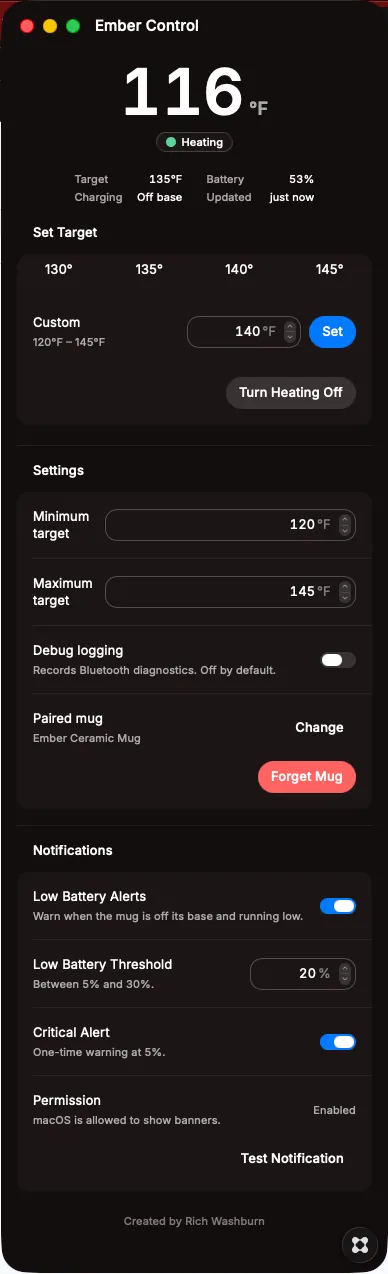


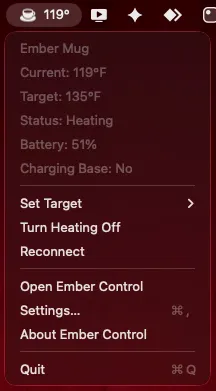
Ember Control is a lightweight, cloud-free macOS menu-bar app for monitoring and controlling your Ember Mug directly from your desktop. See your current drink temperature, target temperature, battery level, charging status, and heating state at a glance—without reaching for your phone or opening the Ember mobile app. Quickly set your preferred temperature, choose from common presets, turn heating off, and receive a desktop notification when your mug’s battery is running low and it is not on the charging coaster. Ember Control communicates directly with your mug over Bluetooth Low Energy. Your mug data stays on your Mac, with no account, cloud service, analytics, or telemetry required. Features: Current temperature displayed in the menu bar Target temperature and heating status Battery level and charging-coaster status Quick temperature presets Custom target-temperature control One-click heating control Automatic mug reconnection Low-battery macOS notifications Compact menu-bar interface Direct local Bluetooth connection No cloud account or subscription required Requirements Compatible Ember Mug Bluetooth-enabled Apple silicon Mac macOS Bluetooth permission The mug should complete its initial setup through the official Ember mobile app before first use * For the most reliable connection, close the Ember mobile app when controlling the mug from your Mac, as the mug may maintain only one active Bluetooth connection at a time. ** Ember Control is an independent application and is not affiliated with or endorsed by Ember Technologies.