
sesh-bar
Switch AWS accounts from your menu bar

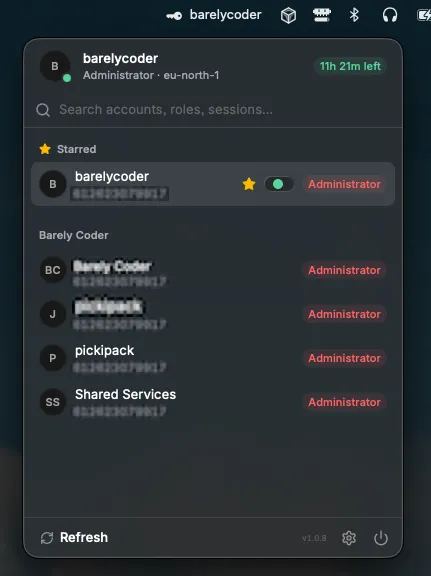
About sesh-bar
A lightweight menu bar app for anyone juggling multiple AWS SSO accounts and roles all day. sesh-bar puts your identity and every account you can assume one click away — no terminal, no aws sso login copy-pasting, no digging through the console's account switcher. Key Features: - Click the menu bar icon to view and switch AWS accounts in a fast popover panel - Star your most-used accounts for quick access - See your current active account and role displayed in the menu bar at all times - Menu bar icon always shows your active account at a glance - Searchable popover lists every account across all your SSO sessions/organizations, grouped and instantly filterable - Right-click an account to pick from any of its roles, or star favorites to pin them to the top - Manage SSO sessions (add, edit, remove, sign in/out) right from Settings — never touch a config file - Remembers your last-used role and per-account region/profile overrides - Token-expiry badge so you always know when you'll need to re-authenticate sesh-bar is a native macOS companion built on top of awsesh (https://github.com/elva-labs/awsesh), the excellent open-source AWS SSO session manager — all credit to the awsesh team for the CLI and SDK that make this possible. sesh-bar wraps that same engine in a fast, always-available menu bar experience.