L6 Manager
Tame your Zoom LiveTrak L6 & L6max files

About L6 Manager
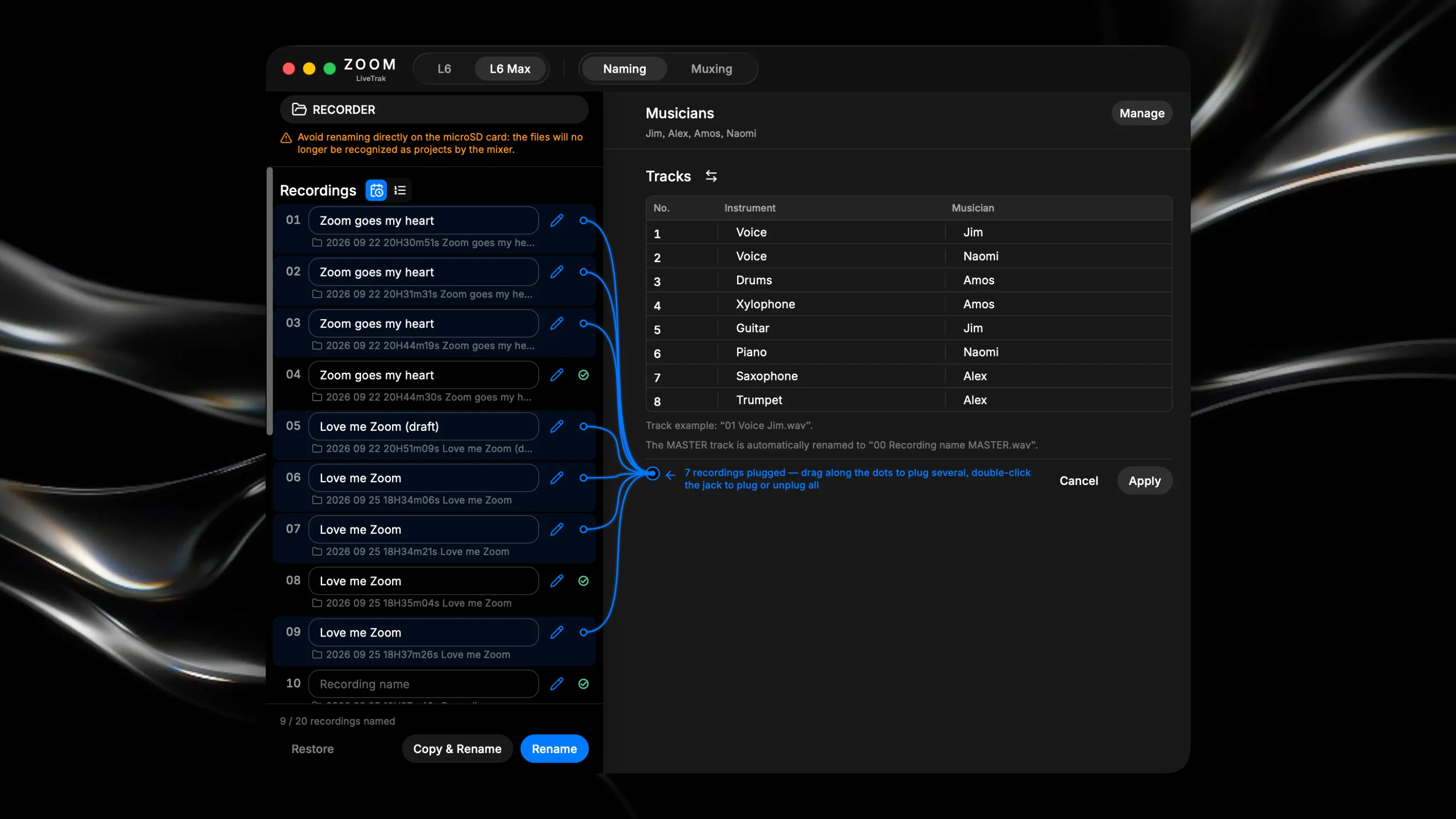
Live multitrack recording sessions leave you with a maze of non-descriptive folder and file names (e.g., 250101_000000 or TRACK05_ST_01.WAV). L6 Manager is a minimal utility that instantly renames and organizes your raw SD card data into clear, mix-ready project folders. Key Features: • Smart Folders: Convert raw hardware timestamps into clean Chronological or Numerical folder names (e.g., 001 Song Name). • Track Routing: Assign musicians and instruments to tracks (1-8) and easily toggle the file naming order. • Master Isolation: The stereo mix is automatically identified and renamed. • Virtual Cables: Batch-apply track configurations to multiple recordings using interactive drag-and-drop cables. Large File Support: Safely preserves Zoom's native file-splitting suffixes for continuous takes over 2GB. • Non-Destructive: Safely "Copy & Rename" files to your local drive, keeping the original SD card readable by the mixer.